Multi-vehicle visits
Some jobs are bigger and more complex than others and require more than a single technician in a single vehicle to be dispatched to complete the work. Visits that require multiple technicians are known as multi-vehicle visits and consist of multiple visits that are part of a visit group.
| multi-vehicle visits are visits that occur concurrently, for visits that must be performed in a specific non-concurrent order, see Visit dependencies. |
Potential multi-vehicle visit scenarios include:
-
Assigning multiple technicians to a visit group regardless of their skills, for instance, if equipment needs to be moved from one site to another.
-
Assigning multiple technicians with the same skill to a visit group, for instance, if a visit group requires two electricians to work together.
-
Assigning multiple technicians with different skills to a visit group, for instance, when a visit requires an electrician and a plumber and the electrical and plumbing tasks must be completed at the same time.
When scheduling multi-vehicle visits, it’s important to consider factors that may affect the alignment of visits within the visit group and the service duration of the individual visits.
If the visits in a visit group have different service durations technicians need to be available at the right time. If electrical work must be completed for the full duration of the visit and plumbing work is only required for the last part of the visit group, it’s important to align the plumbing visit with the end of the electrical visit.
This guide describes how to schedule multi-vehicle visits, with the following examples:
1. Multi-vehicle visit
Learn how to configure an API Key to run the examples in this guide:
In the examples, replace |
A multi-vehicle visit occurs when a visit needs multiple technicians (in separate vehicles) to complete the work at the same time.
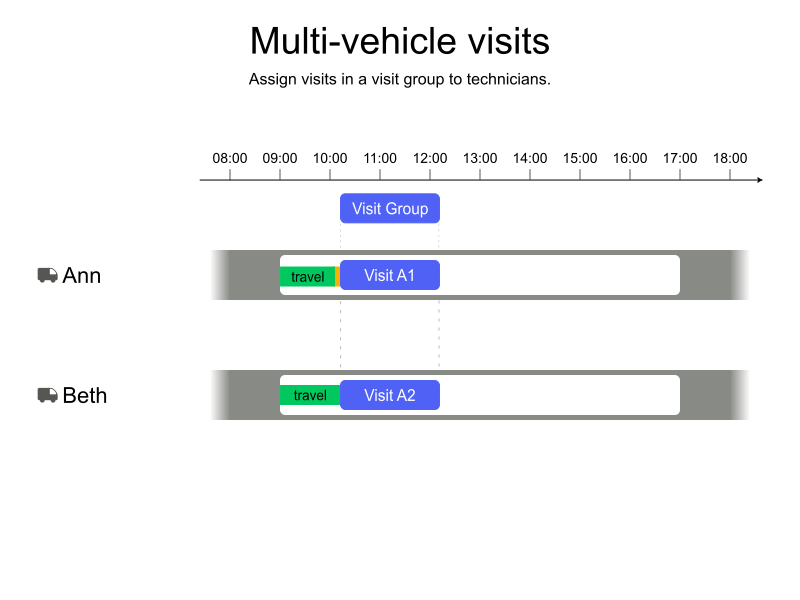
Multi-vehicle visit are represented by visitGroups which contains multiple visits.
In the following example, the visit group contains two visits because two technicians are required to complete the work.
Each visit will be assigned to a different technician.
The technicians will start and finish their visits at the same time.
{
  "visitGroups": [
    {
      "id": "A",
      "visits": [
        {
          "id": "A1",
          "name": "visit group A 1/2",
          "location": [ 33.80209, -84.40296 ],
          "serviceDuration": "PT2H"
        },
        {
          "id": "A2",
          "name": "visit group A 2/2",
          "location": [ 33.80209, -84.40296 ],
          "serviceDuration": "PT2H"
        }
      ]
    }
  ]
}
The No semi-assigned visit groups hard constraint is invoked when a visit requires multiple vehicles and has both assigned and unassigned visits in the group.
The constraint adds a hard penalty to the dataset score if at least one visit is assigned and others are unassigned.
The penalty is derived from the visit’s service duration of each unassigned visit.
Visits will not be scheduled if they break this constraint.
1.1. Multi-vehicle visit example
In the following example, two technicians in separate vehicles must attend a visit group at the same time. No specific skills have been requested for this visit group.
Ann arrives first at the visit location at 09:26 and waits until Beth arrives at 09:33. When both Ann and Beth are present, they start work.
-
Input
-
Output
Try this example in Timefold Platform by saving this JSON into a file called sample.json and make the following API call:
|
curl -X POST -H "Content-type: application/json" -H 'X-API-KEY: <API_KEY>' https://app.timefold.ai/api/models/field-service-routing/v1/route-plans -d@sample.json{
"config": {
"run": {
"name": "Multi-vehicle visit example"
}
},
"modelInput": {
"vehicles": [
{
"id": "Ann",
"shifts": [
{
"id": "Ann-2027-02-01",
"startLocation": [33.68786, -84.18487],
"minStartTime": "2027-02-01T09:00:00Z",
"maxEndTime": "2027-02-01T17:00:00Z"
}
]
},
{
"id": "Beth",
"shifts": [
{
"id": "Beth-2027-02-01",
"startLocation": [33.70474, -84.06508],
"minStartTime": "2027-02-01T09:00:00Z",
"maxEndTime": "2027-02-01T17:00:00Z"
}
]
}
],
"visitGroups": [
{
"id": "A",
"visits": [
{
"id": "A1",
"name": "visit group A 1/2",
"location": [ 33.80209, -84.40296 ],
"serviceDuration": "PT2H"
},
{
"id": "A2",
"name": "visit group A 2/2",
"location": [ 33.80209, -84.40296 ],
"serviceDuration": "PT2H"
}
]
}
]
}
}
To request the solution, locate the ID from the response to the post operation and append it to the following API call:
|
curl -X GET -H 'X-API-KEY: <API_KEY>' https://app.timefold.ai/api/models/field-service-routing/v1/route-plans/<ID>{
"metadata": {
"id": "ID",
"name": "Multi-vehicle visit example",
"submitDateTime": "2024-12-30T06:44:05.3970981Z",
"startDateTime": "2024-12-30T06:44:11.640998054Z",
"activeDateTime": "2024-12-30T06:44:11.953269401Z",
"completeDateTime": "2024-12-30T06:49:12.003329428Z",
"shutdownDateTime": "2024-12-30T06:49:12.317456623Z",
"solverStatus": "SOLVING_COMPLETED",
"score": "0hard/0medium/-156207soft",
"tags": null,
"validationResult": {
"summary": "OK"
}
},
"modelOutput": {
"vehicles": [
{
"id": "Ann",
"shifts": [
{
"id": "Ann-2027-02-01",
"startTime": "2027-02-01T09:00:00Z",
"itinerary": [
{
"id": "A1",
"kind": "VISIT",
"arrivalTime": "2027-02-01T09:26:56Z",
"startServiceTime": "2027-02-01T09:33:56Z",
"departureTime": "2027-02-01T11:33:56Z",
"effectiveServiceDuration": "PT2H",
"travelTimeFromPreviousStandstill": "PT26M56S",
"travelDistanceMetersFromPreviousStandstill": 29982,
"minStartTravelTime": "2027-02-01T00:00:00Z"
}
],
"metrics": {
"totalTravelTime": "PT56M52S",
"travelTimeFromStartLocationToFirstVisit": "PT26M56S",
"travelTimeBetweenVisits": "PT0S",
"travelTimeFromLastVisitToEndLocation": "PT29M56S",
"totalTravelDistanceMeters": 64677,
"travelDistanceFromStartLocationToFirstVisitMeters": 29982,
"travelDistanceBetweenVisitsMeters": 0,
"travelDistanceFromLastVisitToEndLocationMeters": 34695,
"endLocationArrivalTime": "2027-02-01T12:03:52Z"
}
}
]
},
{
"id": "Beth",
"shifts": [
{
"id": "Beth-2027-02-01",
"startTime": "2027-02-01T09:00:00Z",
"itinerary": [
{
"id": "A2",
"kind": "VISIT",
"arrivalTime": "2027-02-01T09:33:56Z",
"startServiceTime": "2027-02-01T09:33:56Z",
"departureTime": "2027-02-01T11:33:56Z",
"effectiveServiceDuration": "PT2H",
"travelTimeFromPreviousStandstill": "PT33M56S",
"travelDistanceMetersFromPreviousStandstill": 40750,
"minStartTravelTime": "2027-02-01T00:00:00Z"
}
],
"metrics": {
"totalTravelTime": "PT1H10M35S",
"travelTimeFromStartLocationToFirstVisit": "PT33M56S",
"travelTimeBetweenVisits": "PT0S",
"travelTimeFromLastVisitToEndLocation": "PT36M39S",
"totalTravelDistanceMeters": 83873,
"travelDistanceFromStartLocationToFirstVisitMeters": 40750,
"travelDistanceBetweenVisitsMeters": 0,
"travelDistanceFromLastVisitToEndLocationMeters": 43123,
"endLocationArrivalTime": "2027-02-01T12:10:35Z"
}
}
]
}
]
},
"kpis": {
"totalTravelTime": "PT2H7M27S",
"travelTimeFromStartLocationToFirstVisit": "PT1H52S",
"travelTimeBetweenVisits": "PT0S",
"travelTimeFromLastVisitToEndLocation": "PT1H6M35S",
"totalTravelDistanceMeters": 148550,
"travelDistanceFromStartLocationToFirstVisitMeters": 70732,
"travelDistanceBetweenVisitsMeters": 0,
"travelDistanceFromLastVisitToEndLocationMeters": 77818,
"totalUnassignedVisits": 0,
"workingTimeFairnessPercentage": 98.2
}
}2. Multi-vehicle visit and skills
In the previous example, no skills were requested for the visit group.
Multi-vehicle visit groups often require technicians with specific skills, for instance, two electricians or one electrician and a plumber.
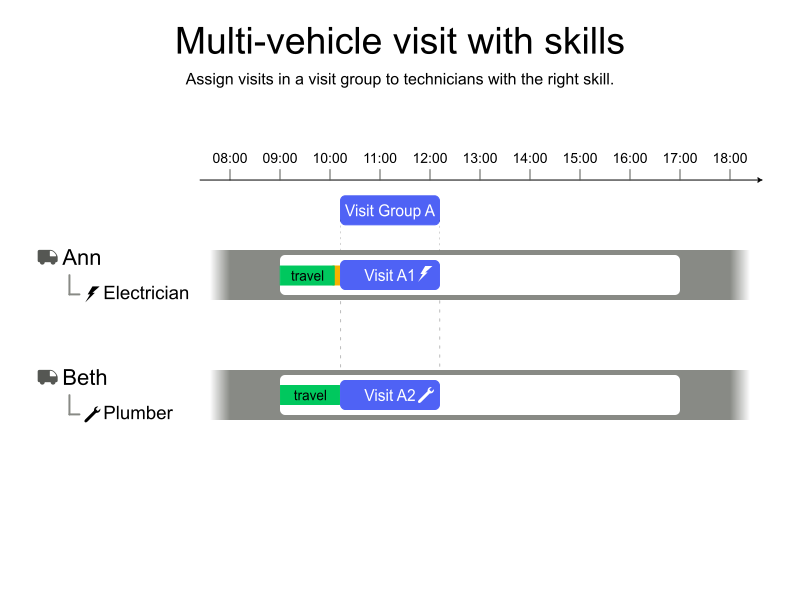
See the Skills guide to learn about requesting skills for visits and defining technicians' skills.
2.1. Multi-vehicle visit and skills example
In the following example, the visit group defines two visits. One visit requires an electrician, and the other visit requires a plumber.
Ann is an electrician and is assigned the visit that requires an electrician. Beth is a plumber and is assigned the visit that requires a plumber.
Ann arrives first at the visit location at 09:26 and waits until Beth arrives at 09:33. When both Ann and Beth are present, they start work.
-
Input
-
Output
Try this example in Timefold Platform by saving this JSON into a file called sample.json and make the following API call:
|
curl -X POST -H "Content-type: application/json" -H 'X-API-KEY: <API_KEY>' https://app.timefold.ai/api/models/field-service-routing/v1/route-plans -d@sample.json{
"config": {
"run": {
"name": "Multi-vehicle visit with different skills example"
}
},
"modelInput": {
"vehicles": [
{
"id": "Ann",
"shifts": [
{
"id": "Ann-2027-02-01",
"startLocation": [33.68786, -84.18487],
"minStartTime": "2027-02-01T09:00:00Z",
"maxEndTime": "2027-02-01T17:00:00Z",
"skills": [
{
"name": "electrician"
}
]
}
]
},
{
"id": "Beth",
"shifts": [
{
"id": "Beth-2027-02-01",
"startLocation": [33.70474, -84.06508],
"minStartTime": "2027-02-01T09:00:00Z",
"maxEndTime": "2027-02-01T17:00:00Z",
"skills": [
{
"name": "plumber"
}
]
}
]
}
],
"visitGroups": [
{
"id": "A",
"visits": [
{
"id": "A1",
"name": "visit group A 1/2",
"location": [ 33.80209, -84.40296 ],
"serviceDuration": "PT2H",
"requiredSkills": [
{
"name": "electrician"
}
]
},
{
"id": "A2",
"name": "visit group A 2/2",
"location": [ 33.80209, -84.40296 ],
"serviceDuration": "PT2H",
"requiredSkills": [
{
"name": "plumber"
}
]
}
]
}
],
"skills": [
"electrician",
"plumber"
]
}
}
To request the solution, locate the ID from the response to the post operation and append it to the following API call:
|
curl -X GET -H 'X-API-KEY: <API_KEY>' https://app.timefold.ai/api/models/field-service-routing/v1/route-plans/<ID>{
"metadata": {
"id": "ID",
"name": "Multi-vehicle visit with different skills example",
"submitDateTime": "2025-01-02T06:28:47.106408637Z",
"startDateTime": "2025-01-02T06:28:54.059707303Z",
"activeDateTime": "2025-01-02T06:28:54.359798493Z",
"completeDateTime": "2025-01-02T06:33:54.439241783Z",
"shutdownDateTime": "2025-01-02T06:33:54.756471992Z",
"solverStatus": "SOLVING_COMPLETED",
"score": "0hard/0medium/-156207soft",
"tags": null,
"validationResult": {
"summary": "OK"
}
},
"modelOutput": {
"vehicles": [
{
"id": "Ann",
"shifts": [
{
"id": "Ann-2027-02-01",
"startTime": "2027-02-01T09:00:00Z",
"itinerary": [
{
"id": "A1",
"kind": "VISIT",
"arrivalTime": "2027-02-01T09:26:56Z",
"startServiceTime": "2027-02-01T09:33:56Z",
"departureTime": "2027-02-01T11:33:56Z",
"effectiveServiceDuration": "PT2H",
"travelTimeFromPreviousStandstill": "PT26M56S",
"travelDistanceMetersFromPreviousStandstill": 29982,
"minStartTravelTime": "2027-02-01T00:00:00Z"
}
],
"metrics": {
"totalTravelTime": "PT56M52S",
"travelTimeFromStartLocationToFirstVisit": "PT26M56S",
"travelTimeBetweenVisits": "PT0S",
"travelTimeFromLastVisitToEndLocation": "PT29M56S",
"totalTravelDistanceMeters": 64677,
"travelDistanceFromStartLocationToFirstVisitMeters": 29982,
"travelDistanceBetweenVisitsMeters": 0,
"travelDistanceFromLastVisitToEndLocationMeters": 34695,
"endLocationArrivalTime": "2027-02-01T12:03:52Z"
}
}
]
},
{
"id": "Beth",
"shifts": [
{
"id": "Beth-2027-02-01",
"startTime": "2027-02-01T09:00:00Z",
"itinerary": [
{
"id": "A2",
"kind": "VISIT",
"arrivalTime": "2027-02-01T09:33:56Z",
"startServiceTime": "2027-02-01T09:33:56Z",
"departureTime": "2027-02-01T11:33:56Z",
"effectiveServiceDuration": "PT2H",
"travelTimeFromPreviousStandstill": "PT33M56S",
"travelDistanceMetersFromPreviousStandstill": 40750,
"minStartTravelTime": "2027-02-01T00:00:00Z"
}
],
"metrics": {
"totalTravelTime": "PT1H10M35S",
"travelTimeFromStartLocationToFirstVisit": "PT33M56S",
"travelTimeBetweenVisits": "PT0S",
"travelTimeFromLastVisitToEndLocation": "PT36M39S",
"totalTravelDistanceMeters": 83873,
"travelDistanceFromStartLocationToFirstVisitMeters": 40750,
"travelDistanceBetweenVisitsMeters": 0,
"travelDistanceFromLastVisitToEndLocationMeters": 43123,
"endLocationArrivalTime": "2027-02-01T12:10:35Z"
}
}
]
}
]
},
"kpis": {
"totalTravelTime": "PT2H7M27S",
"travelTimeFromStartLocationToFirstVisit": "PT1H52S",
"travelTimeBetweenVisits": "PT0S",
"travelTimeFromLastVisitToEndLocation": "PT1H6M35S",
"totalTravelDistanceMeters": 148550,
"travelDistanceFromStartLocationToFirstVisitMeters": 70732,
"travelDistanceBetweenVisitsMeters": 0,
"travelDistanceFromLastVisitToEndLocationMeters": 77818,
"totalUnassignedVisits": 0,
"workingTimeFairnessPercentage": 98.2
}
}3. Multi-vehicle visit alignment
Multi-vehicle visit groups can include visits with different durations. For instance, if an electrician is required for the full duration of the visit, but a plumber is only required for part of the visit.
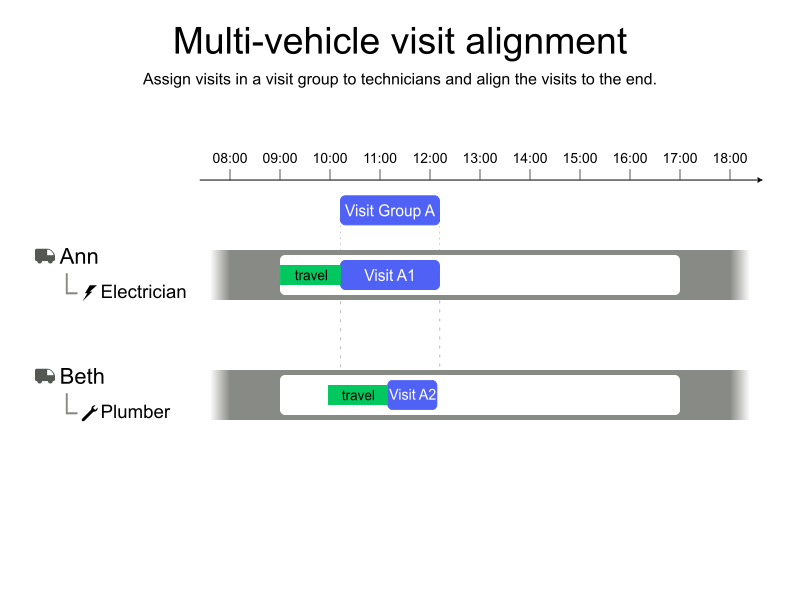
Consider the following visit group with the requirements:
-
An electrician is required for 2 hours.
-
A plumber is required for 1 hour.
Visits with different service durations can be aligned at the start of the visit group or at the end of the visit group. By default, visit alignment is set to the start of the visit group.
Alignment is specified in the visitGroup:
{
  "visitGroups": [
    {
      "id": "A",
      "alignment": "END"
    }
  ]
}
3.1. Multi-vehicle visit alignment example
In the following example, the visits are aligned with the end of the visit group.
Ann is an electrician and is assigned the visit that requires an electrician. Beth is a plumber and is assigned the visit that requires a plumber.
Ann arrives at the visit location at 09:26 and starts work. Beth arrives at 10:26 and starts work. They both finish at 11:26.
-
Input
-
Output
Try this example in Timefold Platform by saving this JSON into a file called sample.json and make the following API call:
|
curl -X POST -H "Content-type: application/json" -H 'X-API-KEY: <API_KEY>' https://app.timefold.ai/api/models/field-service-routing/v1/route-plans -d@sample.json{
"config": {
"run": {
"name": "Multi-vehicle visit alignment example"
}
},
"modelInput": {
"vehicles": [
{
"id": "Ann",
"shifts": [
{
"id": "Ann-2027-02-01",
"startLocation": [33.68786, -84.18487],
"minStartTime": "2027-02-01T09:00:00Z",
"maxEndTime": "2027-02-01T17:00:00Z",
"skills": [
{
"name": "electrician"
}
]
}
]
},
{
"id": "Beth",
"shifts": [
{
"id": "Beth-2027-02-01",
"startLocation": [33.70474, -84.06508],
"minStartTime": "2027-02-01T09:00:00Z",
"maxEndTime": "2027-02-01T17:00:00Z",
"skills": [
{
"name": "plumber"
}
]
}
]
}
],
"visitGroups": [
{
"id": "A",
"alignment": "END",
"visits": [
{
"id": "A1",
"name": "visit group A 1/2",
"location": [ 33.80209, -84.40296 ],
"serviceDuration": "PT2H",
"requiredSkills": [
{
"name": "electrician"
}
]
},
{
"id": "A2",
"name": "visit group A 2/2",
"location": [ 33.80209, -84.40296 ],
"serviceDuration": "PT1H",
"requiredSkills": [
{
"name": "plumber"
}
]
}
]
}
],
"skills": [
"electrician",
"plumber"
]
}
}
To request the solution, locate the ID from the response to the post operation and append it to the following API call:
|
curl -X GET -H 'X-API-KEY: <API_KEY>' https://app.timefold.ai/api/models/field-service-routing/v1/route-plans/<ID>{
"metadata": {
"id": "ID",
"name": "Multi-vehicle visit alignment example",
"submitDateTime": "2024-12-30T07:48:24.797190301Z",
"startDateTime": "2024-12-30T07:48:31.619569451Z",
"activeDateTime": "2024-12-30T07:48:31.941366977Z",
"completeDateTime": "2024-12-30T07:53:31.992185593Z",
"shutdownDateTime": "2024-12-30T07:53:32.345780693Z",
"solverStatus": "SOLVING_COMPLETED",
"score": "0hard/0medium/-156207soft",
"tags": null,
"validationResult": {
"summary": "OK"
}
},
"modelOutput": {
"vehicles": [
{
"id": "Ann",
"shifts": [
{
"id": "Ann-2027-02-01",
"startTime": "2027-02-01T09:00:00Z",
"itinerary": [
{
"id": "A1",
"kind": "VISIT",
"arrivalTime": "2027-02-01T09:26:56Z",
"startServiceTime": "2027-02-01T09:26:56Z",
"departureTime": "2027-02-01T11:26:56Z",
"effectiveServiceDuration": "PT2H",
"travelTimeFromPreviousStandstill": "PT26M56S",
"travelDistanceMetersFromPreviousStandstill": 29982,
"minStartTravelTime": "2027-02-01T00:00:00Z"
}
],
"metrics": {
"totalTravelTime": "PT56M52S",
"travelTimeFromStartLocationToFirstVisit": "PT26M56S",
"travelTimeBetweenVisits": "PT0S",
"travelTimeFromLastVisitToEndLocation": "PT29M56S",
"totalTravelDistanceMeters": 64677,
"travelDistanceFromStartLocationToFirstVisitMeters": 29982,
"travelDistanceBetweenVisitsMeters": 0,
"travelDistanceFromLastVisitToEndLocationMeters": 34695,
"endLocationArrivalTime": "2027-02-01T11:56:52Z"
}
}
]
},
{
"id": "Beth",
"shifts": [
{
"id": "Beth-2027-02-01",
"startTime": "2027-02-01T09:00:00Z",
"itinerary": [
{
"id": "A2",
"kind": "VISIT",
"arrivalTime": "2027-02-01T09:33:56Z",
"startServiceTime": "2027-02-01T10:26:56Z",
"departureTime": "2027-02-01T11:26:56Z",
"effectiveServiceDuration": "PT1H",
"travelTimeFromPreviousStandstill": "PT33M56S",
"travelDistanceMetersFromPreviousStandstill": 40750,
"minStartTravelTime": "2027-02-01T00:00:00Z"
}
],
"metrics": {
"totalTravelTime": "PT1H10M35S",
"travelTimeFromStartLocationToFirstVisit": "PT33M56S",
"travelTimeBetweenVisits": "PT0S",
"travelTimeFromLastVisitToEndLocation": "PT36M39S",
"totalTravelDistanceMeters": 83873,
"travelDistanceFromStartLocationToFirstVisitMeters": 40750,
"travelDistanceBetweenVisitsMeters": 0,
"travelDistanceFromLastVisitToEndLocationMeters": 43123,
"endLocationArrivalTime": "2027-02-01T12:03:35Z"
}
}
]
}
]
},
"kpis": {
"totalTravelTime": "PT2H7M27S",
"travelTimeFromStartLocationToFirstVisit": "PT1H52S",
"travelTimeBetweenVisits": "PT0S",
"travelTimeFromLastVisitToEndLocation": "PT1H6M35S",
"totalTravelDistanceMeters": 148550,
"travelDistanceFromStartLocationToFirstVisitMeters": 70732,
"travelDistanceBetweenVisitsMeters": 0,
"travelDistanceFromLastVisitToEndLocationMeters": 77818,
"totalUnassignedVisits": 0,
"workingTimeFairnessPercentage": 98.13
}
}4. Multi-vehicle visit with best proficiency
Technicians can have different proficiency levels.
A technician with a proficiency level of 0.5 can complete a 2 hour task in 1 hour, whereas a technician with a proficiency of 1.0 will take the full 2 hours.
See skill multipliers for more details.
When two technicians with the same skill are required for a visit group, you can choose the following service duration strategies:
-
INDIVIDUAL: the service duration for each visit in the visit group is determined by the proficiency of the technician assigned to the visit. -
BEST_PROFICIENCY: the service duration for all visits in the visit group is determined by the technician with the best proficiency. This can be useful, for instance, if a senior and a junior technician are assigned to a multi-resource task together as the senior technician’s proficiency will determine the service duration.
In the following scenario, a visit group that requires two electricians is assigned to Ann and Beth. Both visits in the visit group have a service duration of 2 hours. Ann has a proficiency of 0.5, and Beth has a proficiency of 1.0.
Using the INDIVIDUAL service duration strategy, Ann’s visit will have a service duration of 1 hour, and Beth’s visit will have a service duration of 2 hours.
Using the BEST_PROFICIENCY service duration strategy, both visits will have a service duration of 1 hour.
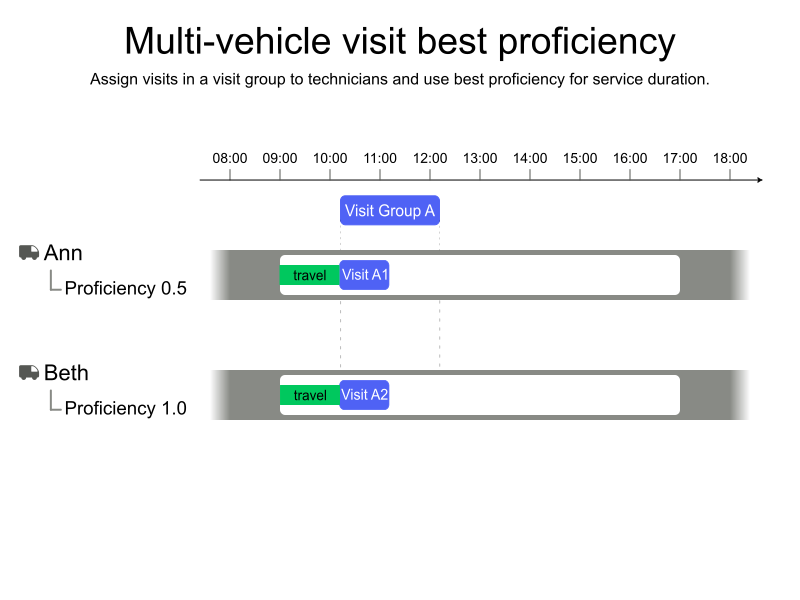
ServiceDurationStrategy only applies to technicians with the same skills.
|
Technician’s proficiency in a skill is set by adding the multiplier to the skill:
{
  "id": "Ann",
  "shifts": [
    {
      "id": "Ann-2027-02-01",
      "startLocation": [33.68786, -84.18487],
      "minStartTime": "2027-02-01T09:00:00Z",
      "maxEndTime": "2027-02-01T17:00:00Z",
      "skills": [
        {
          "name": "electrician",
          "multiplier": 0.5
        }
      ]
    }
  ]
}
The service duration strategy for a visit group is set by adding either INDIDIVUAL or BEST_PROFICIENCY to serviceDurationStrategy:
{
  "visitGroups": [
    {
      "id": "A",
      "serviceDurationStrategy": "BEST_PROFICIENCY"
    }
  ]
}
4.1. Multi-vehicle visit with best proficiency example
In the following example, a visit group requires two electricians. Each visit in the visit group has a service duration of two hours.
Ann and Beth are assigned the visits.
The service duration strategy is BEST_PROFICIENCY and the service duration is determined by the most proficient technician.
Because Ann has a multiplier of 0.5, both visits are scheduled for one hour.
-
Input
-
Output
Try this example in Timefold Platform by saving this JSON into a file called sample.json and make the following API call:
|
curl -X POST -H "Content-type: application/json" -H 'X-API-KEY: <API_KEY>' https://app.timefold.ai/api/models/field-service-routing/v1/route-plans -d@sample.json{
"config": {
"run": {
"name": "Multi-vehicle visit best proficiency"
}
},
"modelInput": {
"vehicles": [
{
"id": "Ann",
"shifts": [
{
"id": "Ann-2027-02-01",
"startLocation": [33.68786, -84.18487],
"minStartTime": "2027-02-01T09:00:00Z",
"maxEndTime": "2027-02-01T17:00:00Z",
"skills": [
{
"name": "electrician",
"multiplier": 0.5
}
]
}
]
},
{
"id": "Beth",
"shifts": [
{
"id": "Beth-2027-02-01",
"startLocation": [33.70474, -84.06508],
"minStartTime": "2027-02-01T09:00:00Z",
"maxEndTime": "2027-02-01T17:00:00Z",
"skills": [
{
"name": "electrician",
"multiplier": 1.0
}
]
}
]
}
],
"visitGroups": [
{
"id": "A",
"serviceDurationStrategy": "BEST_PROFICIENCY",
"visits": [
{
"id": "A1",
"name": "visit group A 1/2",
"location": [ 33.80209, -84.40296 ],
"serviceDuration": "PT2H",
"requiredSkills": [
{
"name": "electrician"
}
]
},
{
"id": "A2",
"name": "visit group A 2/2",
"location": [ 33.80209, -84.40296 ],
"serviceDuration": "PT2H",
"requiredSkills": [
{
"name": "electrician"
}
]
}
]
}
],
"skills": [ "electrician" ]
}
}
To request the solution, locate the ID from the response to the post operation and append it to the following API call:
|
curl -X GET -H 'X-API-KEY: <API_KEY>' https://app.timefold.ai/api/models/field-service-routing/v1/route-plans/<ID>{
"metadata": {
"id": "ID",
"name": "Multi-vehicle visit best proficiency",
"submitDateTime": "2025-01-02T06:55:02.249544617Z",
"startDateTime": "2025-01-02T06:55:09.049699532Z",
"activeDateTime": "2025-01-02T06:55:09.369711741Z",
"completeDateTime": "2025-01-02T07:00:09.432180923Z",
"shutdownDateTime": "2025-01-02T07:00:09.704172749Z",
"solverStatus": "SOLVING_COMPLETED",
"score": "0hard/0medium/-156207soft",
"tags": null,
"validationResult": {
"summary": "OK"
}
},
"modelOutput": {
"vehicles": [
{
"id": "Ann",
"shifts": [
{
"id": "Ann-2027-02-01",
"startTime": "2027-02-01T09:00:00Z",
"itinerary": [
{
"id": "A1",
"kind": "VISIT",
"arrivalTime": "2027-02-01T09:26:56Z",
"startServiceTime": "2027-02-01T09:33:56Z",
"departureTime": "2027-02-01T10:33:56Z",
"effectiveServiceDuration": "PT1H",
"travelTimeFromPreviousStandstill": "PT26M56S",
"travelDistanceMetersFromPreviousStandstill": 29982,
"minStartTravelTime": "2027-02-01T00:00:00Z"
}
],
"metrics": {
"totalTravelTime": "PT56M52S",
"travelTimeFromStartLocationToFirstVisit": "PT26M56S",
"travelTimeBetweenVisits": "PT0S",
"travelTimeFromLastVisitToEndLocation": "PT29M56S",
"totalTravelDistanceMeters": 64677,
"travelDistanceFromStartLocationToFirstVisitMeters": 29982,
"travelDistanceBetweenVisitsMeters": 0,
"travelDistanceFromLastVisitToEndLocationMeters": 34695,
"endLocationArrivalTime": "2027-02-01T11:03:52Z"
}
}
]
},
{
"id": "Beth",
"shifts": [
{
"id": "Beth-2027-02-01",
"startTime": "2027-02-01T09:00:00Z",
"itinerary": [
{
"id": "A2",
"kind": "VISIT",
"arrivalTime": "2027-02-01T09:33:56Z",
"startServiceTime": "2027-02-01T09:33:56Z",
"departureTime": "2027-02-01T10:33:56Z",
"effectiveServiceDuration": "PT1H",
"travelTimeFromPreviousStandstill": "PT33M56S",
"travelDistanceMetersFromPreviousStandstill": 40750,
"minStartTravelTime": "2027-02-01T00:00:00Z"
}
],
"metrics": {
"totalTravelTime": "PT1H10M35S",
"travelTimeFromStartLocationToFirstVisit": "PT33M56S",
"travelTimeBetweenVisits": "PT0S",
"travelTimeFromLastVisitToEndLocation": "PT36M39S",
"totalTravelDistanceMeters": 83873,
"travelDistanceFromStartLocationToFirstVisitMeters": 40750,
"travelDistanceBetweenVisitsMeters": 0,
"travelDistanceFromLastVisitToEndLocationMeters": 43123,
"endLocationArrivalTime": "2027-02-01T11:10:35Z"
}
}
]
}
]
},
"kpis": {
"totalTravelTime": "PT2H7M27S",
"travelTimeFromStartLocationToFirstVisit": "PT1H52S",
"travelTimeBetweenVisits": "PT0S",
"travelTimeFromLastVisitToEndLocation": "PT1H6M35S",
"totalTravelDistanceMeters": 148550,
"travelDistanceFromStartLocationToFirstVisitMeters": 70732,
"travelDistanceBetweenVisitsMeters": 0,
"travelDistanceFromLastVisitToEndLocationMeters": 77818,
"totalUnassignedVisits": 0,
"workingTimeFairnessPercentage": 97.36
}
}5. Actual times in multi-vehicle visits
When re-planning an active shift, individual visits within a visit group can carry actual arrival, service start, and departure times independently. See Real-time planning: actual arrival and departure times for the general description of actual time fields.
5.1. Precedence rules
Because a visit group requires group-wide alignment, the group visit schedule is derived from two sources: the aligned plan and the provided actual times. The following rules determine which source is used for each output field:
| Field | Condition | Value used |
|---|---|---|
|
|
Actual schedule |
|
|
Aligned planned schedule |
|
|
Actual start service time |
|
|
Later of: actual-computed start (from actual arrival) and aligned planned start |
|
No actual fields are set |
Aligned planned start service time |
|
|
Actual departure time (or |
|
Only |
Later of: actual-computed departure and aligned planned departure |
|
No actual fields are set |
Aligned planned departure time |
The departure time rule has the most significant effect: once actualStartServiceTime or actualDepartureTime is recorded on a visit, the departure time for that visit is taken from the actual schedule.
This departure time is then used as the travel start for the technician’s next visit.
|
When only For example, if a visit is part of a group aligned to start at 11:00 and the shift has a break from 10:00–11:00, the output will show that break as applied even if To avoid this, provide |
5.2. Alignment is based on planned timing
Group alignment — determining when all technicians in the group start service together — is always computed from the planned schedule, not from actual times.
If one technician arrived late and has an actualDepartureTime that differs from the plan, the aligned start service time for other technicians in the group is not automatically adjusted to reflect this.
The actual departure time does propagate correctly to that technician’s own subsequent visits, but the other group members continue to use their aligned planned timing.
|
To get the most accurate re-plan when a multi-vehicle visit has completed or is in progress, provide actual times for all visits in the group. When only some visits carry actuals, the group alignment continues to use planned timing for the visits without actuals, which may cause the output schedule for those visits to diverge from what happened in the field. |
Next
-
See the full API spec or try the online API.
-
Learn more about field service routing from our YouTube playlist.
-
Use Time windows to specify visit availability and limit when visits can be scheduled.
-
Learn about Visit requirements and Visit dependencies.